
Lithium Pro
FaultExceptionBooks & Reference
4.1126.00 Reviews
- Version
- 1.4
- Installs
- 50.00K
- Age Rating
- Everyone
Screenshots

Our Review of Lithium Pro
 Analysis by Appyee
I find a shared tablet can be a handy place for books everyone in the household wants to read, but a good reading app still needs to suit the person holding it. Lithium Pro is a paid Books & Reference app from FaultException, aimed at readers who already have eBooks and want a focused place to open and read them. I’d think of it as a reading tool rather than a family library or a service for discovering new titles: its appeal is the reading experience, not coordinating a household’s entire collection.
What a shared reading device is good for
Picture a quiet evening when one person has finished a book and another wants to read a chapter on the same device. A reader that can open books and adjust its display gives each person a simple way to settle in without changing the book itself. Lithium’s auto-detection can also make a personal collection easier to browse when supported files are available on the device, rather than requiring a manual import for every title.
That convenience has a boundary: the app is not a household organizer. I would not assume it separates readers’ books, notes, highlights, or preferences into individual profiles. If several people use one device, agree on where book files are kept and whose annotations are being added. That small bit of coordination matters more than it might at first, especially when someone is studying or wants to preserve personal notes.
Set expectations before sharing
The Pro edition is best understood as an upgrade for someone already interested in Lithium, not as a complete reading service with a built-in catalog. Its short description is simply “Lithium Pro,” and the listing frames it as a way to unlock more features in Lithium and support its developer. That makes the key practical question whether the extra features matter to the person paying, rather than whether a whole household needs another app.
At $1.99, it is a modest one-time purchase in everyday terms, but I would still check that the intended reader is the person who wants the upgrade. On a shared device, purchase access and the app’s reading setup are separate concerns; I would not treat buying Pro as a way to create separate accounts or manage who can open a book. If the device is used by several people, make the purchase decision with the regular reader in mind.
The app is rated Everyone, which makes its age classification broad, not a promise that every book opened in it is suitable for every reader. The content comes from the eBooks someone chooses to read. For a child using a shared tablet, I would select the files and configure the device itself with care rather than relying on the app’s age label to filter reading material.
Where it fits among reading options
Compared with a bookstore or subscription reading app, Lithium is more appealing when you already have eBook files and want a straightforward reader. Those services can be more convenient if your main need is finding, buying, or syncing a catalog of titles. A basic file viewer may be enough for someone who only opens a book occasionally, while a dedicated reader is more useful if font, theme, spacing, highlights, and notes affect how comfortably you read.
The trade-off is that a focused reader asks you to bring your own reading material and manage the household habits around it. Before sharing a device, I’d test the workflow with a book that has no important annotations: open it, adjust the display for the next reader, and check that everyone understands how highlights and notes are being used. This is a practical way to avoid accidental changes to study material or confusion about who marked a passage.
FaultException’s app has an average rating of 4.1 from around 1,300 ratings, with about 126 written reviews, and it has passed 50,000 installs. Those figures suggest a modest, established audience, but they don’t tell me whether the Pro unlock is right for a particular reader. I would base that decision on the reading tools you actually use and whether you want to support the developer.
The app was released on September 13, 2017, and its current version is 1.4; it supports Android 4.1 and later. The older minimum OS may be useful if you are setting up a compatible older device as a dedicated reader, though I would still check that it runs well on the specific device before making it the household’s main reading screen.
So, I recently got my hands on the Lithium Pro app, and let me tell you, it’s been quite an adventure. If you’re into reading eBooks and want an app that’s both sleek and functional, you may want to stick around for this review.
First Impressions and Features
When I first launched the Lithium Pro app, the minimalist design immediately caught my eye. It’s got this clean, no-fuss vibe that makes it super easy to navigate. You won’t find any clutter here, which is honestly a breath of fresh air. The app focuses on what really matters: your reading experience.
One of the standout features is its auto-detection of books. You don’t have to manually import files, which is a huge time saver. As someone who’s always downloading new eBooks, this feature is like a gift from the tech gods. Plus, it supports multiple formats, so you’re not restricted to just one type of file.
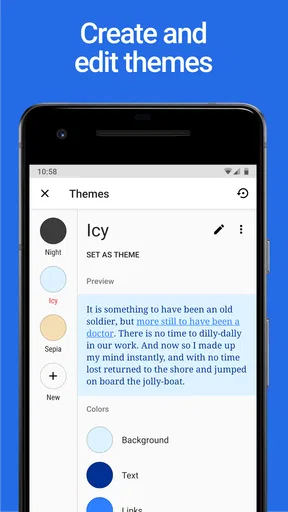
Then there’s the customization. I mean, who doesn’t love tweaking their reading interface to make it truly their own? The app allows you to adjust fonts, themes, and even line spacing. So if you’re like me and have a preference for night mode to save your eyes during those late-night reading sessions, you’re in luck!
Reading Experience
I’ve used quite a few eBook readers, and the reading experience on this app is pretty top-notch. The pages turn smoothly, and there’s a nifty highlighting feature that lets you mark important text. It’s perfect for those moments when you come across a passage so good, you just have to save it for later.
Let’s not forget about the notes function. You can jot down thoughts or insights without leaving the app, which is perfect for study sessions or just keeping track of your thoughts for future reference. And if you ever need to find something specific, the search function is quite robust, quickly pinpointing what you’re looking for.
Performance and Usability
Now, you might be wondering about the app’s performance. In my experience, it runs smoothly with no noticeable lag, even when loading larger files. This is crucial because nothing kills the joy of reading faster than an app that freezes or crashes.
Usability-wise, the interface is intuitive. You won’t need a manual to figure out how to use it, which is always a plus. Even if you’re not particularly tech-savvy, you’ll find navigating through the app a breeze. Everything is where you’d expect it to be, and the learning curve is practically non-existent.
Final Thoughts
In conclusion, the app is a fantastic option for anyone who loves eBooks and wants a seamless reading experience. Its clean design, customization options, and efficient performance make it a standout choice in the world of eBook readers.
If you haven’t tried it yet, I’d say it’s definitely worth a download. Whether you’re a casual reader or a bookworm who devours novels like they’re going out of style, this app has something to offer for everyone. So go ahead, give it a shot, and dive into your next great read!
Making the tools work for your routine
The most useful way I see highlights, notes, and search working together is as a light study workflow. I can mark a passage while reading, add a short thought while the context is fresh, then use search later to return to a phrase or topic. That is more practical than treating highlights as a complete research system: for serious coursework, I would still keep important references somewhere I can organize and back up independently.
For fiction, I’d use the same tools sparingly. A quick note can capture a character name or a question to revisit, but stopping to annotate every chapter can make reading feel like homework. The adjustable line spacing and font are better everyday tools: once I find a comfortable setting, I can leave it alone and focus on the book. On a shared device, though, remember that a setting chosen for one reader may not suit the next, so a quick visual check before handing it over saves irritation.
Who will appreciate it, and who may not
I’d recommend this reader to someone with a folder of eBooks who values control over the page and wants simple annotation tools close at hand. It also makes sense for a student reading supplied course material, or for a person who keeps a small collection of files and prefers not to use a store-centered app. The benefits are most apparent when you read often enough to care about typography and want to return to passages without hunting through a whole book.
I’d steer away if your main priority is discovering new titles, purchasing books inside one ecosystem, or having a household-wide shared library with clear individual reading histories. A bookstore app or subscription service is likely the more natural fit for those jobs. Likewise, someone who reads only an occasional file may find a simple viewer adequate and have little reason to pay for an upgrade. Pro is a poor fit if you are expecting it to supply books or replace the account and library features of a larger reading platform.
A sensible way to try it on a household device
If you are considering a common tablet, I’d start with one adult’s book and one short reading session rather than moving everyone’s files at once. Check that the book appears as expected, set a comfortable font and theme, and try a highlight and note on a passage that is easy to find again. Then let another person open a different book and see whether the handoff feels clear. This small trial reveals whether the app’s straightforward reading approach suits your household without risking a pile of personal annotations.
For a shared study device, I would agree on a simple convention: keep personal notes minimal, and avoid editing or marking a book another reader is using unless that person is happy with it. Search can help locate a specific passage during a group discussion, but it does not substitute for deciding who maintains the file or notes. The app works best when the household handles those social boundaries itself rather than expecting the reader to do it automatically.
What to consider before choosing
A common question is whether Pro is useful on its own. I would treat it as an upgrade tied to the Lithium reading experience, not as a standalone source of books; the stated purpose is unlocking additional features and supporting FaultException. Another practical question is whether it suits a child. Its Everyone age rating is reassuring as a classification for the app, but the books are selected by whoever adds them, so adults should choose age-appropriate files and supervise shared-device access in the usual way.
Readers also often want to know whether a file-based reader is better than a mainstream book platform. For me, it depends on where your books come from: if you already have compatible files and want a calm, adjustable reading screen, this approach is appealing; if you want a ready-made catalog, purchases, and ecosystem conveniences, the mainstream option is easier. I’d also consider the device itself. The Android minimum is 4.1, but compatibility alone does not guarantee that an older tablet will feel pleasant for long sessions, so test readability and responsiveness before making it a dedicated reader.
My household verdict
For one regular reader, or a household that understands it is sharing a reading tool rather than a managed family library, Lithium Pro has a clear role. I like the combination of automatic book discovery, display adjustments, annotations, and search because it supports both relaxed reading and focused study without making the page feel busy. The main trade-off is that books and sharing habits remain the user’s responsibility, so it is not the best answer for families who need separate profiles or coordinated collections.
My recommendation is to choose it when the person paying already uses Lithium and can name the extra reading features they want. If the household mainly needs a place to browse or buy books, choose a service built around a catalog instead. If it needs a quiet, customizable reader for files already on hand, this is a more convincing option—and a brief test with one book is the easiest way to decide whether its uncluttered approach fits your routine.
Verdict
Strengths of Lithium Pro
- User-friendly interface enhances navigation.
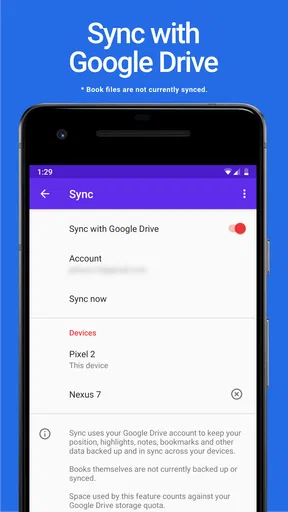
- Seamless integration with cloud services.
- Customizable themes for personalized reading.
- Supports multiple eBook formats.
- Efficient performance with low battery usage.
Limitations of Lithium Pro
- Limited annotation features available.
- No text-to-speech functionality.
- Ads in free version can be intrusive.
- Occasional sync issues with large files.
- Requires in-app purchases for premium features.
Similar Picks in This Category
View All
Google Play Books & Audiobooks
Google LLC4.7

네이버 - NAVER
NAVER Corp.3.5

Wattpad - Read & Write Stories
Wattpad.com3.7

King James Bible - Verse+Audio
Ozion4.8

Bible Offline-KJV Holy Bible
Bíblia Offline4.9

Amazon Kindle: Reading App
Amazon Mobile LLC4.8
Frequently Asked Questions
What are the key features of Lithium Pro?
Lithium Pro is a premium eBook reader that offers a seamless experience for reading ePub files. Key features include customizable themes, night mode for comfortable reading in low light, and intuitive navigation. It also supports bookmarks, notes, and highlights, enhancing your reading experience with personalized touches.
Is there a free version of Lithium Pro available?
Yes, Lithium offers a free version with basic features that let you read ePub files. However, the Pro version provides additional functionalities like customizable themes and ad-free reading. It's perfect for users who want a more refined and personalized reading experience without interruptions.
How does Lithium Pro enhance the reading experience compared to other apps?
Lithium Pro stands out with its user-friendly design and advanced customization options. Unlike many other eBook readers, it allows users to tailor their reading experience with themes and night mode. Its smooth navigation and support for annotations make it a preferred choice for avid readers seeking comfort and convenience.
Can I sync my reading progress across multiple devices using Lithium Pro?
Currently, Lithium Pro does not support cloud syncing across devices. Your reading progress and bookmarks are saved locally on your device. This means you’ll need to manually transfer your reading data if you switch devices, which is something to consider if you read on multiple platforms.
Is Lithium Pro compatible with all eBook formats?
Lithium Pro is specifically designed for ePub files, which is a widely used format for eBooks. It does not support other formats like PDF or MOBI. If your library consists mainly of ePub books, Lithium Pro is an excellent choice. However, for other formats, you might need additional apps.
